Using the wrong USB-C cable can lead to slow charging and data loss.
The best USB-C cables ensure fast charging, efficient data transfer, and reliable video output. This guide focuses on cables tailored for charging, data transfer, and video connectivity. We compared 6 options based on maximum wattage, data transfer speed, and build quality. Each option offers unique strengths, from high power delivery to robust construction. The best USB-C cable for most people is the Anker USB C to USB C Cable, thanks to its durable design and dependable performance across various devices.
Our Top USB-C Cables

Anker USB C to USB C Cable
Durable design with 60W fast charging
The Anker USB C to USB C Cable is our top pick for its robust construction and reliable performance. Ideal for tech enthusiasts who need a dependable cable for various devices, its durability stands out in this lineup.

Belkin USB C to USB C Cable
240W fast charging with multiple lengths
The Belkin USB C to USB C Cable is a strong runner-up, particularly for users needing higher wattage. It offers impressive charging speeds and versatility across devices.


Baseus USB C Cable
100W Power Delivery for Charging
Ideal for users who need a long cable for fast charging. Less suited for those needing high-speed data transfer.
Swipe to compare all 3 →
As an Amazon Associate, this site earns from qualifying purchases made through links in this guide.
Our selection of USB-C cables varies in charging power, data transfer capabilities, and durability. Each product meets specific needs, whether for charging laptops, transferring data quickly, or connecting to displays. Compare all 6 options in the table below to find the best fit for your requirements.
QUICK COMPARISON
Compare All 6 Picks
Key Specs at a Glance
01 Anker USB C to USB C Cable Top Pick
Data Rate
480Mbps
Wattage
60W
Pack
2-pack
Best for
Fast charging and data transfer
02 Belkin USB C to USB C Cable Runner-Up
Data Rate
480Mbps
Wattage
240W
Pack
2-pack
Best for
Fast charging Apple devices
03 Baseus USB C Cable Best Long Cable
Data Rate
Not stated
Wattage
100W
Pack
Single
Best for
Long cable, fast charging
04 NOMAD USB-C Cable Best Premium
Data Rate
Not stated
Wattage
Not stated
Pack
Single
Best for
Durable, long-lasting use
05 Cable Matters USB4 Cable Best for Data Transfer
Data Rate
80Gbps
Wattage
240W
Pack
Single
Best for
High-speed data transfer
06 Apple 240W USB-C Cable Best for Apple MacBook Users
Data Rate
480 Mbps
Wattage
240W
Pack
Single
Best for
Charging MacBook and high-power devices
Specs as stated in each product’s listing; “Not stated” means the listing gives no figure.
BEFORE YOU BUY
Independent Specs Matter
Charging wattage, data transfer generation, and video-output capability are independent specs. A 240W cable may not support high data speeds or video.
Samsung Charging Requirements
For Samsung's 45W Super Fast Charging, a 5A-rated cable is essential to achieve maximum speed.
Cable Length and Speed Trade-Offs
USB4 cables are typically shorter due to signal integrity issues at high speeds; consider active cables for longer lengths.
Detailed Product Reviews
Here is our closer look at each pick — what it offers, why it made the list, who it suits, and where it falls short.
01 Top Pick: Anker USB C to USB C Cable
02 Runner-Up: Belkin USB C to USB C Cable
03 Best Long Cable: Baseus USB C Cable
04 Best Premium: NOMAD USB-C Cable
Top Pick: Anker USB C to USB C Cable

This 2-pack of 3.3 ft cables features a reinforced nylon exterior and a sturdy core that can withstand up to 5,000 bends. Such durability means you can rely on it for daily use without worrying about fraying or breaking. The cable supports Power Delivery for high-speed charging up to 60W, making it perfect for charging laptops and other power-hungry devices quickly.
With a data transfer speed of 480Mbps, it allows for efficient file transfers between devices. The included hook-and-loop cable tie helps keep your workspace organized, which is a nice touch for those who value tidiness.
CNN Underscored recognized this cable for its braided jacket and metal-reinforced connectors, which contribute to its longevity. Additionally, Anker backs this product with a lifetime warranty, providing extra assurance for users seeking quality and reliability in their accessories.
Why it made the list
It offers a great balance of durability and performance. Compared to other products, its robust design and lifetime warranty make it particularly appealing.
Who it’s for
This cable is perfect for users looking for a durable, high-speed charging solution for various USB-C devices. Those who need a flexible, lightweight option might find it less suitable due to its sturdier build.
Key features
Durable Design: Reinforced nylon exterior withstands up to 5,000 bends.
Fast Charging: Supports Power Delivery for up to 60W high-speed charging.
High-Speed Data Transfer: Offers data transfer speeds of 480Mbps.
Flaws but not dealbreakers
Only available in gray or red color options, and has a less flexible feel compared to silicone-jacketed alternatives.
Durable design with 60W fast charging
The Anker USB C to USB C Cable is our top pick for its robust construction and reliable performance. Ideal for tech enthusiasts who need a dependable cable for various devices, its durability stands out in this lineup.
Runner-Up: Belkin USB C to USB C Cable

This 6.6 ft cable supports up to 240W Power Delivery, making it suitable for fast charging not only iPhones but also MacBooks and other devices. With the ability to charge an iPhone 16 Pro Max to 50% in just 25 minutes, it’s a great option for those in need of quick power-ups.
The cable is USB-IF certified and allows for data transfer speeds up to 480Mbps, which is standard for USB-C but still efficient for syncing data. It comes in multiple lengths and color options, allowing users to choose the best fit for their setup, although it is limited to 3.3 ft or 6.6 ft options.
While it boasts a durable braided exterior that can survive over 100,000 bends, independent reviewers note that it is classified as USB 2.0, which limits its data transfer capabilities compared to other more advanced options. Additionally, it lacks DisplayPort Alt Mode wiring, which means it cannot drive an external monitor, potentially limiting its utility for some users.
Why it made the list
Its high wattage capability and multiple length options make it a great choice for fast charging. However, it falls short in data transfer speeds compared to the Cable Matters USB4 Cable.
Who it’s for
This cable is ideal for users who prioritize fast charging for their devices, especially Apple products. Those who need high-speed data transfer and video output may want to consider other options.
Key features
Fast Charging: Delivers 240W to charge devices quickly.
Multiple Length Options: Available in multiple lengths and colors.
High-Speed Data Transfer: Supports USB 2.0 technology with 480Mbps transfer speed.
Flaws but not dealbreakers
Classified as USB 2.0, limiting data transfer speeds to 480Mbps; lacks DisplayPort Alt Mode for external monitor support.
240W fast charging with multiple lengths
The Belkin USB C to USB C Cable is a strong runner-up, particularly for users needing higher wattage. It offers impressive charging speeds and versatility across devices.
Best Long Cable: Baseus USB C Cable

The Baseus USB C Cable delivers impressive charging capabilities with its claimed 100W power delivery.
Its construction features a premium zinc alloy with a nylon braided design. This cable is versatile, compatible with a wide range of devices from smartphones to larger gadgets like laptops.
However, one limitation is its data transfer speed. It supports USB 2.0, capping at 480 Mbps, which might not suffice for those requiring faster data transfer rates. Additionally, as Baseus is a lesser-known brand compared to names like Anker or Belkin, some independent reviewers have expressed concerns regarding the verification of its wattage claims.
Why it made the list
This cable is highlighted for its robust charging capabilities and longer length, offering more flexibility than shorter alternatives.
Who it’s for
Perfect for users who prioritize fast charging over data transfer speeds. Not ideal for those who need high-speed data capabilities or prefer established brands.
Key features
100W Power Delivery: Supports fast charging for various devices.
Nylon Braided Design: Offers durability and resistance to wear.
Zinc Alloy Construction: Prevents oxidation and enhances longevity.
Flaws but not dealbreakers
Data transfer is limited to USB 2.0 speeds, which may not meet the needs of all users. Reviewers note that Baseus is less established than brands like Anker or Belkin.
100W Power Delivery for Charging
Ideal for users who need a long cable for fast charging. Less suited for those needing high-speed data transfer.
Best Premium: NOMAD USB-C Cable
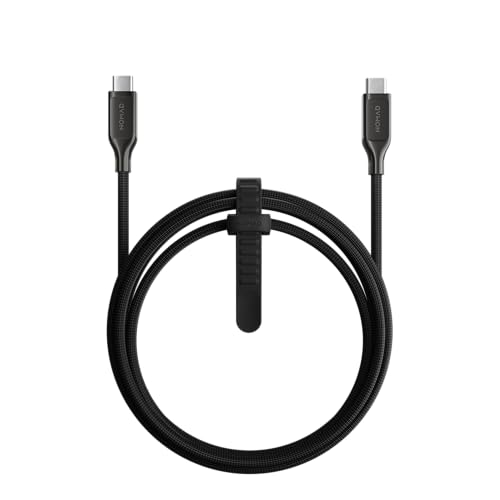
This 1.5m cable features a Kevlar braid, known for its incredible strength and cut-resistance. This means you can use it daily without worrying about wear and tear.
With a Power Delivery capability of 100W, it supports fast charging for a wide range of USB-C devices. The premium electroplated metal connectors add to its durability.
CNN Underscored selected this cable as their upgrade pick after testing its performance, noting its thick Kevlar jacket and five-year warranty. However, the heavier and stiffer design may not be ideal for users seeking a lightweight, flexible cable for portability.
Why it made the list
Its unparalleled durability and high power delivery capability set it apart as the premium option in this roundup. Compared to the other cables, it excels in robustness but is heavier and stiffer, which may not suit everyone.
Who it’s for
This cable is perfect for users who need a rugged and reliable charging solution. Those looking for a lightweight cable may find it cumbersome due to its stiff design.
Key features
Kevlar Braid: Provides incredible strength and cut-resistance.
100W Power Delivery: Supports fast charging for a wide range of devices.
Five-Year Warranty: Offers long-term.
Flaws but not dealbreakers
The premium Kevlar build makes it noticeably stiffer and heavier than other options; priced significantly higher than less rugged competitors.

Kevlar® Reinforced for Durability
A premium choice for those seeking durability and high power delivery. Ideal for users who prioritize robustness over portability.
Best for Data Transfer: Cable Matters USB4 Cable
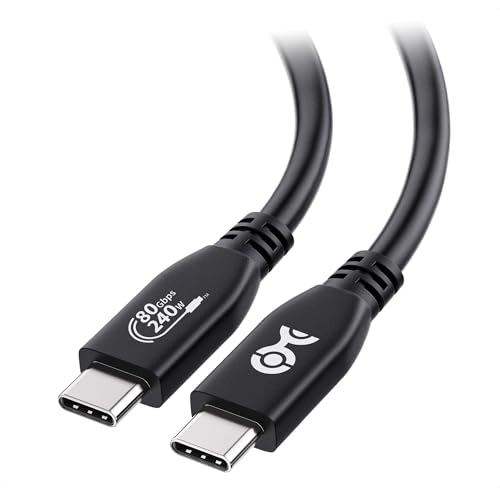
The Cable Matters USB4 Cable is engineered for those who demand top-tier data transfer speeds. With its 80Gbps bandwidth capability, it offers a robust solution for transferring large files swiftly.
Compatibility is a standout feature, as this cable supports Thunderbolt 5. This makes it a versatile choice for both work setups and entertainment systems.
While the cable is designed for high-speed data and video output, it's worth noting that its power delivery is capped at 240W. Independent reviewers suggest that while this is suitable for most laptops, those with high-end gaming laptops might require additional power solutions.
Why it made the list
This cable excels in data transfer and video output, outperforming others in these areas within the lineup.
Who it’s for
Perfect for users prioritizing high-speed data and video transfer. Not ideal for those needing power delivery above 240W.
Key features
80Gbps Bandwidth: Offers lightning-fast data transfer speeds.
Thunderbolt 5 Compatible: Broad compatibility with modern devices.
240W Power Delivery: Supports efficient charging for most laptops.
Flaws but not dealbreakers
At 4.9 ft, it is shorter than the long-cable picks in this lineup, so runs to a distant dock or monitor may need planning.

Best for high-speed data transfer and video output. Suitable for tech enthusiasts who prioritize performance.
Best for Apple MacBook Users: Apple 240W USB-C Cable
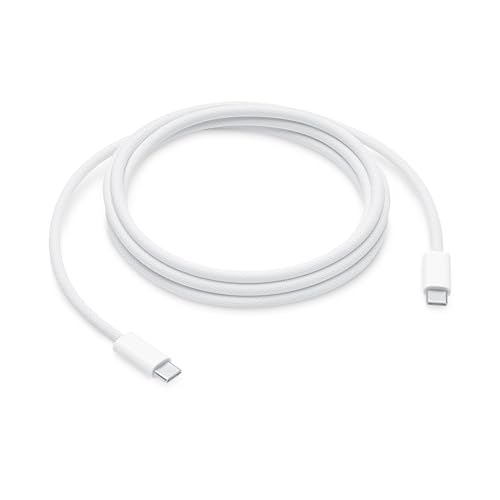
This 2-meter cable is designed specifically for high-power devices, supporting up to 240W charging, making it ideal for MacBook Pro users. The woven design enhances durability, while the USB-C connectors on both ends ensure secure connections.
When paired with a compatible USB-C power adapter, this cable allows users to take advantage of fast charging for their devices, including select iPhone models. The extra length provides flexibility, making it easier to connect devices in various setups.
However, it's worth noting that this cable only supports USB 2.0 data transfer at 480 Mbps, limiting its utility for those requiring faster data speeds. Additionally, there are concerns about the exterior durability over time, as reported by some users.
Why it made the list
Its high wattage capability and reliable build make it a top choice for MacBook users, particularly for those needing fast charging. While it offers excellent performance, it lacks the versatility of charging multiple device types like the Baseus cable.
Who it’s for
Ideal for Apple users who need a long cable for charging and syncing high-power devices. Those looking for a cable that supports higher data transfer rates or video output may want to explore other options.
Key features
240W Power Delivery: Supports fast charging for high-draw devices like MacBook Pro.
Woven Design: Durable construction that withstands wear and tear.
2 Meter Length: Provides extra reach for convenient connections.
Flaws but not dealbreakers
Data transfer is limited to USB 2.0 speeds of 480 Mbps, which may not satisfy users needing higher rates. Some users have reported durability issues with the exterior over time.

The Apple 240W USB-C Cable excels for MacBook users seeking a reliable long cable for fast charging.
Who This Guide Is For
THIS GUIDE IS FOR YOU IF
- + You need a reliable cable for fast charging multiple devices.
- + You want a durable cable for frequent travel and use.
- + You require high-speed data transfer for large files.
SKIP THIS GUIDE IF
- − You only need a basic cable for occasional use; look at simpler models.
What to Consider Before Buying
01
Charging Wattage
Ensure the cable's wattage matches your device's requirements, especially for fast charging.
02
Data Transfer Speed
Check the USB generation to ensure it meets your data transfer needs, like USB4 for high speeds.
03
Video Output Capability
Look for cables with DisplayPort Alt Mode if you need video output to monitors or TVs.
04
Build Quality and Length
Consider the cable's material and length for durability and flexibility in various setups.
How We Picked
01 · TOP PICK
02 · RUNNER-UP
03 · BEST LONG CABLE
04 · BEST PREMIUM
05 · BEST FOR DATA TRANSFER
06 · BEST FOR APPLE MACBOOK USERS
We started with 8 Amazon listings, removing 2 for relevance, leaving us with 6 products to compare.
Maximum Wattage. Cables should match the power delivery standard needed for your devices.
Data Transfer Speed. High-performance cables should support the appropriate USB generation for your needs.
Build Quality. Durable construction materials and bend-life ratings are crucial for longevity.
Our comparisons are based on manufacturer specifications and product listing data for each model. Candidate listings were verified live on Amazon on 2026-10-11.
What Didn’t Make the Cut
Most guides only show the winners. These candidates were also in our research pool and were set aside before ranking — here’s exactly why:
These are listing-verification outcomes, not judgments of product quality.
Anker 643 USB-C to USB-C Cable — we couldn't confidently match it to one exact Amazon listing, and a near-miss link is worse than none.
Anker 765 USB-C to USB-C Cable — we couldn't confidently match it to one exact Amazon listing, and a near-miss link is worse than none.
Frequently Asked Questions
Q. Does a 240W USB-C cable also support video output and fast data transfer?
No, a 240W cable can still be USB 2.0 with no DisplayPort Alt Mode support; check specs separately.
Q. What cable do I need to fast-charge a Samsung Galaxy phone at its maximum 45W speed?
You need a 5A-rated cable, typically marketed as a 100W cable; a 3A/60W cable won't deliver top speed.
Q. Why are USB4 / Thunderbolt 4 cables so short?
They require active electronics to maintain 40Gbps signal integrity over longer distances; passive cables are limited to around 0.8 m.
Q. Is a braided USB-C cable actually more durable than a rubber one?
Yes, higher-rated materials like Kevlar and double-braided nylon can endure significantly more bends compared to rubber cables.
Q. Do I need a special USB-C cable to connect a monitor or external display?
Yes, only cables with DisplayPort Alt Mode wiring can carry video; standard charging cables cannot.
Current Amazon Bestsellers
Live from Amazon and updated automatically — not editorially vetted. These may overlap with our picks above, and prices can differ between listings and sizes.


Final Verdict
For reliable performance, the Anker USB C to USB C Cable is ideal for most users, particularly for everyday charging and data transfer. The Belkin USB C to USB C 240W Cable is perfect for high-power devices, while the Baseus USB C Cable offers great value for laptop charging. Always check the cable's wattage and compatibility with your devices.
Last update on 2026-10-31 / Affiliate links / Images from Amazon Product Advertising API